
My Baggage Support

Find step-by-step guides, troubleshooting tips, and feature explainers to get the most out of our website.

What is volumetric weight?

Booking

What is volumetric weight?

Last updated on 17 Feb, 2026

To make sure you always get the best value for money, My Baggage uses a tiered pricing system across all routes. No matter where you’re shipping - Europe, the USA or anywhere else in the world - we use one simple rule to determine your price.

So, how is the price calculated? It all comes down to two numbers.

The Two Types of Weight

  • Actual Weight: How heavy the item physically is - the number you see on the scales.

  • Volumetric Weight: How much space the item takes up - based on its size rather than how heavy it is.

This is the foundation of how your price is worked out. In short, your price is determined by whichever is HIGHER: your actual weight or your volumetric weight.


What Price Will I Pay?

The price you pay depends on which of your weights is higher - your actual weight or your volumetric weight.

Below are two examples to show how this works in practice:

Item A: Example of ACTUAL Weight
Sending a Box of Books - this item could be small and compact, with a LOW volumetric weight, therefore the price you pay will be based on ACTUAL weight.
Item B: Example of VOLUMETRIC Weight
Sending a Camping Bag - this item could be large and bulky, with a HIGH volumetric weight, therefore the price you will pay will be based on VOLUMETRIC weight.

How Volumetric Weight is Calculated

Volumetric weight is calculated by taking three measurements - the item’s depth, height, and width - to produce a final figure. You can work it out using the formula below.
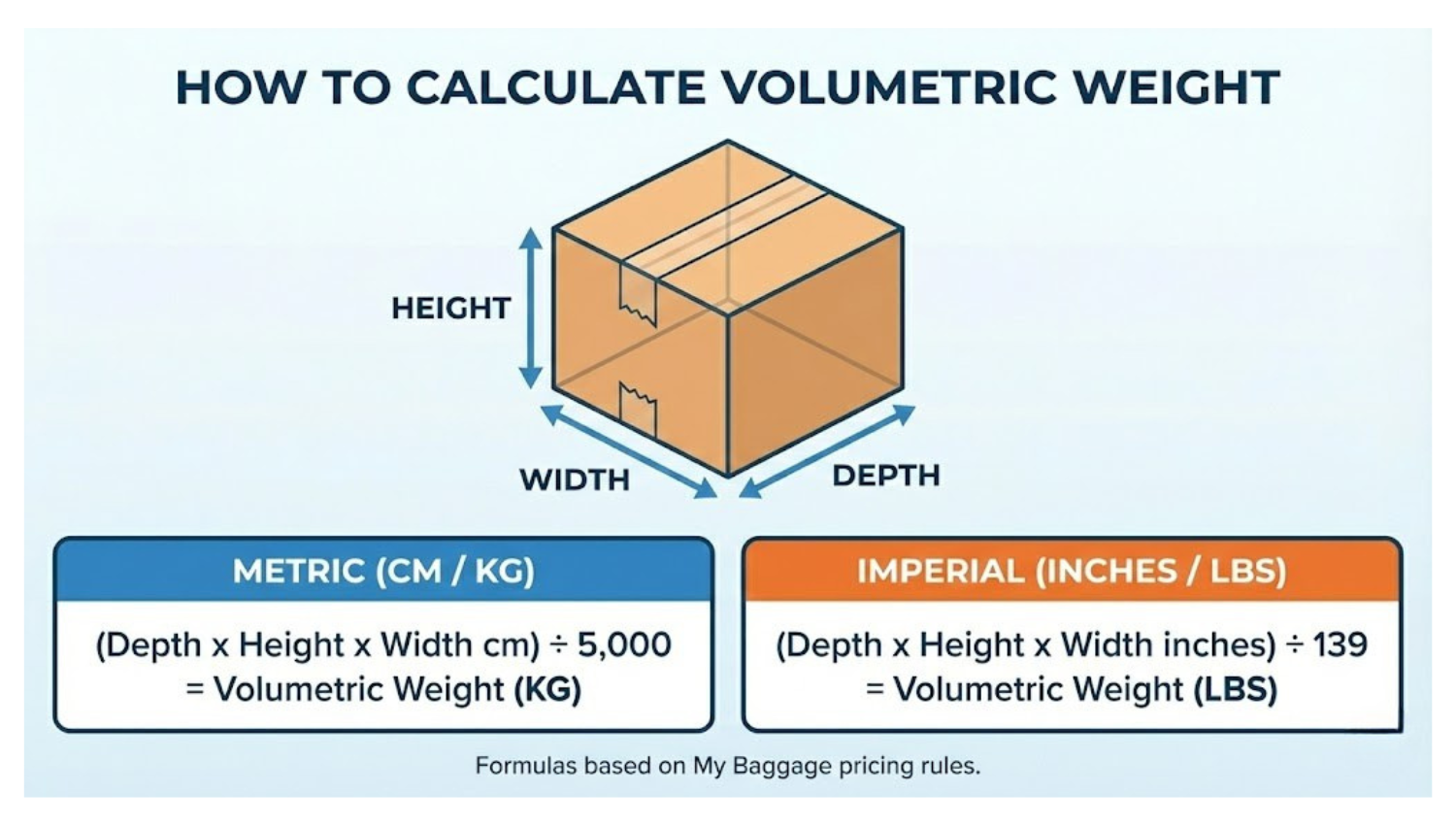
My Baggage - How to calculate volumetric weight.png

We’ve included two examples: one using metric measurements and one using imperial.

Example 1: Metric Measurements (CM/KG)
Measure all 3 dimensions in centimetres (CM) (Depth x Height x Width) ÷ 5,000 = Volumetric Weight (KG) Step-by-Step Guide: 1. Measure the depth, height, and width of your item in centimetres (CM) 2. Multiply the 3 numbers together 3. Divide the total amount by 5,000 4. Compare the total to your ACTUAL weight. The higher amount = your price band.
Example 2: Imperial Measurements (inches/lbs)
Measure all 3 dimensions in inches. (Depth x Height x Width) ÷ 139 = Volumetric Weight in pounds (lbs) Step-by-Step Guide: 1. Measure the depth, height, and width of your item in inches 2. Multiply the 3 numbers together 3. Divide the total amount by 139 4. Compare the total to your ACTUAL weight. The higher amount = your price band.

When you place your order with My Baggage, simply enter your item’s dimensions and weight, and we’ll automatically determine the price based on whether the actual or volumetric weight is higher.

Remember: when measuring suitcases, be sure to include the full dimensions - handles, wheels, and any bulging areas like pockets or compartments. The same principle applies to unusually shaped boxes, parcels, or cases (such as a musical instrument case); always take into account every protruding part and any empty space.
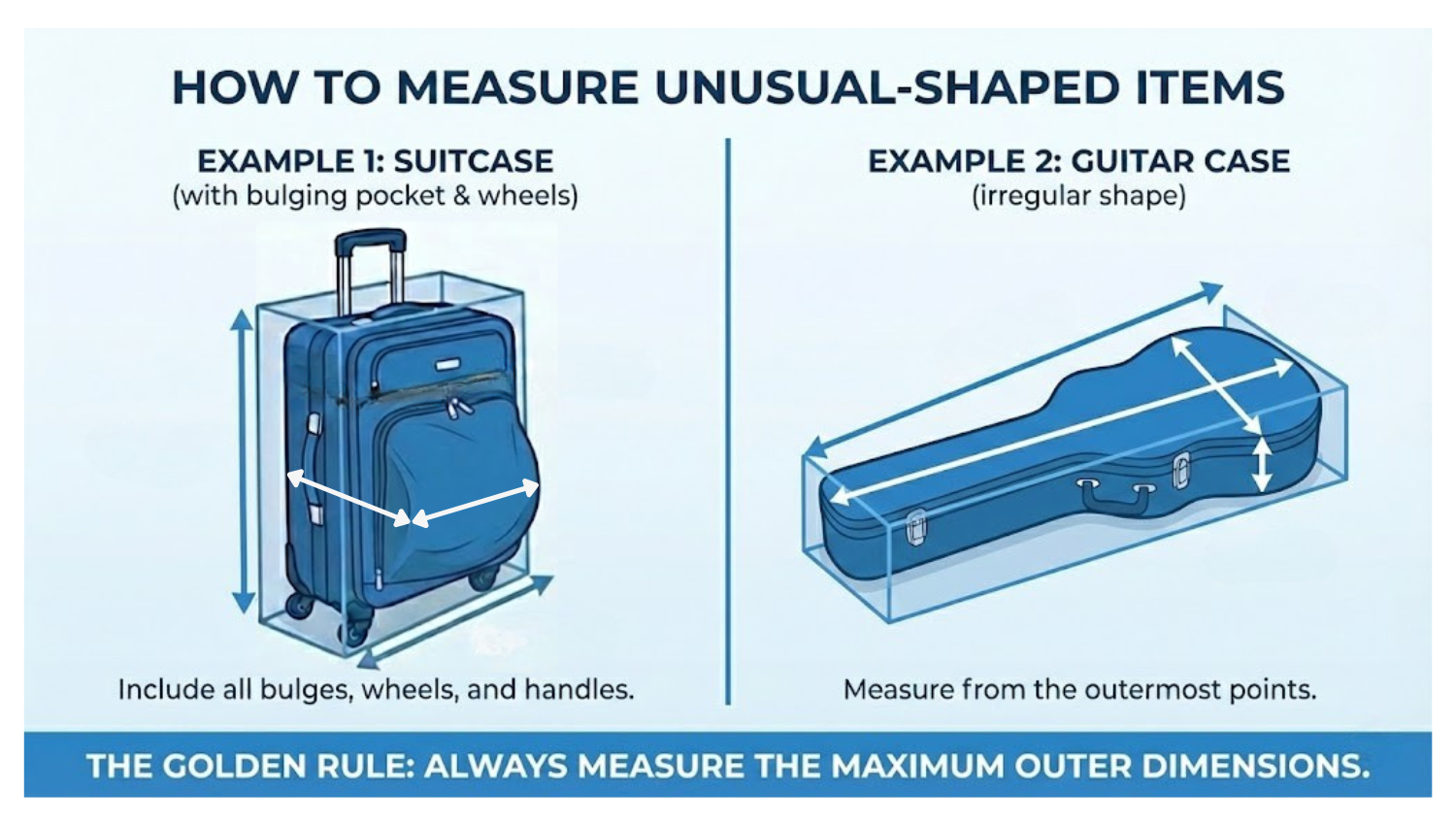
My Baggage - Measure unusual-shaped items.png

Volumetric Weight with My Baggage

Although we’ve explained what actual and volumetric weight are, and how we calculate our prices, the good news is that you don’t need to do any of the maths yourself. Simply enter your item’s accurate dimensions and weight when adding your items, and we’ll take care of the rest.

To help even further, we’ve included some of our most frequently asked questions about volumetric weight below.

Why is my volumetric weight higher than my actual weight?
This is very common with luggage and boxes. A suitcase that is only half full of clothes might weigh 15 kg on the scales, but it occupies the same space in the courier’s vehicle as a full one. The volumetric formula accounts for this. Light, bulky items will almost always have a higher volumetric weight than actual weight.
Does My Baggage calculate volumetric weight automatically?
Yes. When you enter your item’s dimensions and actual weight during the booking process, the My Baggage system automatically calculates the volumetric weight, compares it to the actual weight, and displays the correct price band. You do not need to calculate it yourself, but understanding how it works helps you plan ahead and avoid surprises.
What if I measure in inches but want to compare in kg?
We recommend measuring everything in centimetres and kilograms for consistency. However, if you prefer to work in imperial, simply use the inches formula to get your volumetric weight in lbs, then convert both the actual weight and volumetric weight to lbs before comparing them. Do not mix units (e.g., do not compare a result in kg with an actual weight in lbs).
What is the maximum weight My Baggage can accept?
For all international routes, no individual item can exceed 68 kg in either actual weight or volumetric weight. If your item exceeds this limit, it cannot be shipped. For domestic UK shipments on the Express 24 service, the maximum actual weight is 30 kg per item.
What if my item is over 1.2m (47 inches) on international routes?
On applicable international routes, items with a longest dimension exceeding 1.2m / 47 inches require manual handling and a surcharge applies. Please refer to the specific route details for the exact thresholds and surcharge amounts for your service.
What happens if I change my measurements because it lowers my price?
You must provide the actual and accurate dimensions and weight of your items. Providing incorrect measurements, even unintentionally, may result in additional oversize or overweight charges and could lead to delays with your shipment. Please make sure you enter the most accurate information possible. If you’re unsure about any details, our customer service team will be happy to help.
My item is close to the limit. What should I do?
If your item is close to the size or weight limit for your chosen route, we recommend double-checking your measurements carefully. Always measure to the outermost point. Our booking system will flag any issues before you confirm, but it is better to verify in advance. If you’re unsure about any details, our customer service team will be happy to help.

Did you find this article helpful?
Previous

Remote Areas

Next